
GoBright updated their hygienic mode feature.
This was first introduced during COVID-19, and, if enabled, it requires a desk to be cleaned after every use. The Connect & Glow would turn purple until a card was swiped or if the desk was updated in the portal.
However, it is now possible to highlight the desk as required to be cleaned at the end of every day instead of after every check-in. This is configured in the profile attached to the desk.
Head to Settings > Work > Profiles and select the profile linked to the desk(s) you wish to enable this for.
You can configure your profile from here, depending on your preferences. Here is an example of setting the desk as required to be cleaned at 5pm every day:
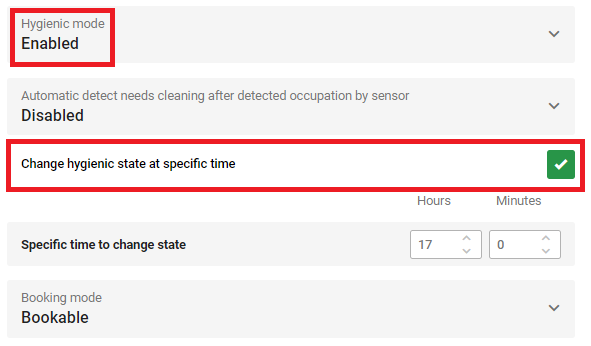
Please note: If this feature is enabled, the Connect will not turn off outside of office hours until it has been marked as clean.
This feature is also supported for the Interact.