.png)
Solution Overview Multi-Camera Solution
Flexible
meeting spaces require flexibility solutions to maximise performance. A front facing camera may be suitable for
regular meetings, but for presentation or teacher / student interaction,
additional AV equipment should be considered.
For many
spaces, all that’s required is multiple camera, and the ability to switch
between them easily. The addition of a
ReThink AV auto switching matrix allows both the in-room PC and guest laptops
to access the AV and simply switch to the desired camera within the UC client
(Teams/Zoom etc).
For
additional ease of use, the matrix can be programmed to switch sources on a
keyboard shortcut or integrated into a room control system.
Up to 5 USB
peripherals can be configured and dual screen output is fully supported to
allow maximum performance and flexibility.
Optionally,
wireless sharing can be integrated with the in-room PC. We recommend AirServer or Mersive solutions,
or for customers who want to use a wireless dongle, the Maxhub WB05 provides
wireless sharing without the need to install software or connect to a wifi
hotspot.
For many spaces, all that’s required is multiple camera, and the ability to switch between them easily. The addition of a ReThink AV auto switching matrix allows both the in-room PC and guest laptops to access the AV and simply switch to the desired camera within the UC client (Teams/Zoom etc).
Key Benefits
- One-touch join of Microsoft Teams meetings - Easily switch between USB peripherals within your UC client, via keyboard shortcut or via control system - Up to 5 USB peripherals can be installed - Dual screen support - Bring Your Own Meeting support connects screen and peripherals. Host the meeting on your computer. - Auto switching to your computer as soon as you plug in - Single USB-C connects your computer for video, audio, data and network*. Plus, it charges your battery! *Wired
network connection required to ReThink switch. |
· Core Components - Dual Maxhub ND65 CMA 65” displays · - Huddly C1 All-in-one camera / mic /
speaker system
· - Additional cameras (RocWare RC821
shown)
· - Additional audio system (if required
– Nureva - HDL310 shown)
· - ReThink
AV MatrixRAV-MS-4x2DLHU-Tx/Rx
- ReThink active USB-C cable | Optional Components for wireless sharing - Mersive POD v4 - AirServer Connect 3 - MAXHUB WB05 + button |
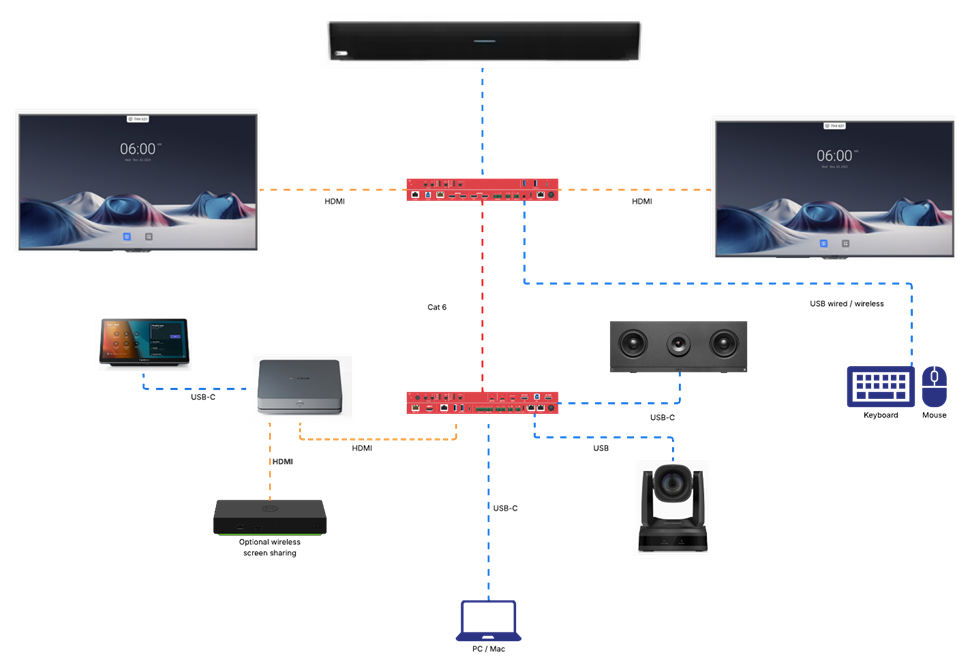
This example
includes dual screens and a MAXHUB XCore Pro MTR.
A Huddly C1 is
provided for front of room camera and meeting audio.
When
switching to presenter mode, the RocWare RC821 PTZ camera is mounted at the
rear of the room to capture the presenter.
A Nureva
HDL310 is included to provide whole room audio in presentation mode.
A wireless
keyboard & mouse are installed to allow quick switching between setups.
The Mersive POD 4 provides wireless sharing via
the MTR
A USB-C cable connects to the ReThink matrix to
allow laptops to access the solution and enable BYOM or local presentation.
Connection Diagram