
Wi-Fi signal strength is measured in dBm, with values usually ranging from -30 dBm to -90 dBm.
A value closer to 0 (e.g. -50 dBm) indicates a stronger, faster connection, while lower numbers (e.g. -80 dBm) indicates a weaker, slower, or unstable connection.
- -50 dBm to -60 dBm (Excellent/Good)
- -60 dBm to -70 dBm (Fair)
- -70 dBm to -80 dBm (Weak)
- -80 dBm to -90 dBm (Unusable)
Walls and electronic interference will significantly drop the dBm value in your environment.
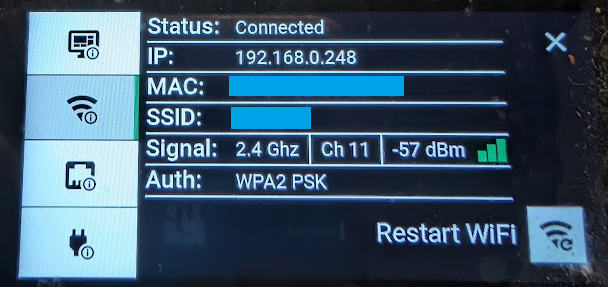
Finding your dBm level on an Interact
- Press and hold the time in the top-right for a few seconds
- Select open device info
Here you have 4 options on the left hand side. On this screen you can find:
- Status
- IP address
- MAC address
- SSID
- Signal, channel and dBm
- Auth mode used (e.g WPA2 PSK)
We need to concentrate on the 2nd option down - WiFi. There is a signal indicator that will fluctuate in real-time. Values between -50 dBm and -65 dBm are good.
Important: Interacts operate on the 2.4 Ghz spectrum. 5 Ghz is not supported.
Still having issues? Check out our on site install guide here.